

Parallel Paths: A Journey with Angular Route Guards

Have you ever been certain about how something works, only to find out you were completely off the mark? I recently had one of those humbling experiences while working on a seemingly straightforward ticket involving Angular route guards. Spoiler alert: things weren't as linear as I thought.
The Ticket That Started It All
The task was simple—or so I believed. I needed to implement a new route in our Angular application and protect it using two guards:
1. Auth Guard: To ensure the user is authenticated.
2. Feature Flag Guard: To check if the user has access to a specific feature.
Our AuthService, AuthGuard and FeatureFlagGuard were already implemented. Both guards depended on this AuthService to retrieve the user information. Since AuthService is a singleton in our app, I figured everything would flow smoothly. The Auth Guard used the cached user data without issues. However, the Feature Flag Guard was using an observable that didn't wait for the user to load completely.
The Assumption: Sequential Execution
I was under the impression that Angular route guards executed in priority order, especially after Angular v7.1. My mental model was simple: the Auth Guard would run first, the user data would be available, and then the Feature Flag Guard would use that already-loaded data. It made perfect sense—until it didn't.
The Reality Check: Parallel Execution
To my surprise, I started encountering inconsistent behavior. The Feature Flag Guard occasionally failed because the user data wasn't available when it executed. Puzzled, I dove into the Angular documentation and stumbled upon a crucial detail:
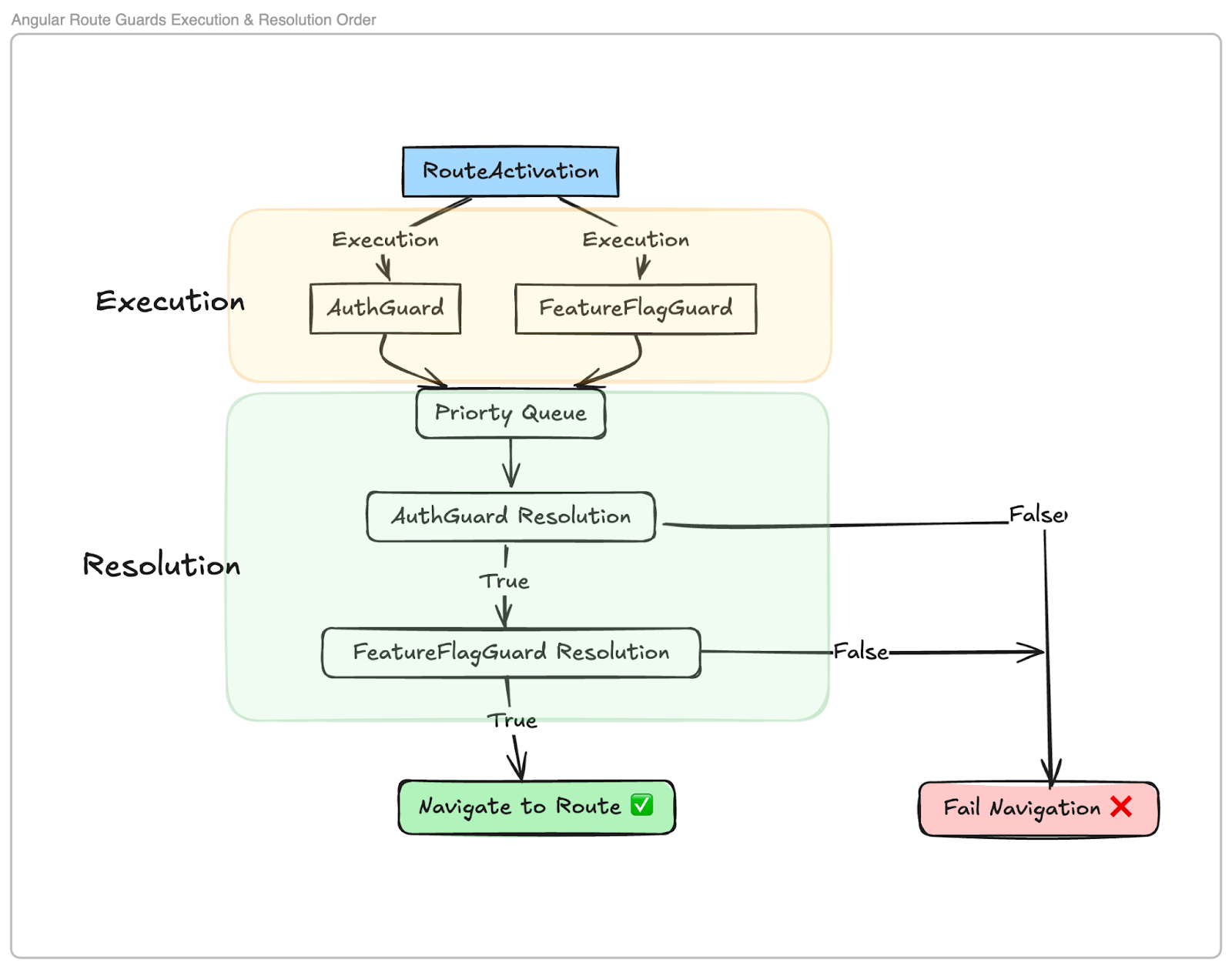
Angular route guards execute in parallel, not sequentially and resolve in priority order.
According to the Angular docs, guards are executed simultaneously. The route resolution only proceeds after all guards have been executed. The order in which they resolve doesn't affect their execution timing.
Visualizing the Execution Flow
To better understand this, I created a simple flowchart:
Code Example
Here's a simplified version of the problematic code:
// auth.guard.ts

@Injectable({ providedIn: "root" })
export class AuthGuard implements CanActivate {

  constructor(private authService: AuthService) {}

  canActivate(): Observable<boolean> {

    return this.authService.getUser().pipe(
      map((user) => !!user),
      catchError(() => of(false))
    );
  }
}

// feature-flag.guard.ts

@Injectable({ providedIn: "root" })
export class FeatureFlagGuard implements CanActivate {

  constructor(private featureFlagService: FeatureFlagService) {}

  canActivate(): Observable<boolean> {

    return this.featureFlagService
      .hasAccess()
      .pipe(catchError(() => of(false)));

  }

}

// feature-flag.service.ts

@Injectable({ providedIn: "root" })
export class FeatureFlagService {

  constructor(private authService: AuthService) {}

  hasAccess(): Observable<boolean> {

    // This method didn't wait for the user to load
    const user = this.authService.userOrNull();

    return of(user?.hasFeatureFlag);

  }
}
The Problem
The FeatureFlagService was using a method `userOrNull()` to retrieve the user, which didn't wait for the user data to load from the `AuthService`. Since the guards execute in parallel, the user data wasn't guaranteed to be available when `FeatureFlagGuard` ran. This led to the guard failing intermittently because it was trying to access properties of an undefined user.
The Solution: Ensuring Data Availability
To fix this, I modified the `FeatureFlagService` to wait for the user data to be available before checking the feature flag. Instead of using a synchronous method, I switched to using an observable that emits when the user data is loaded.
// feature-flag.service.ts

@Injectable({ providedIn: "root" })
export class FeatureFlagService {

  constructor(private authService: AuthService) {}

  hasAccess(): Observable<boolean> {
    return this.authService.getUser().pipe(
      map((user) => user.hasFeatureFlag),
      catchError(() => of(false))
    );
  }
}
Lessons Learned
Assumptions Are Dangerous: Just because something seems logical doesn't make it true. Always verify with the documentation.
Understand the Framework: Knowing that Angular executes guards in parallel is crucial for designing your route protection strategy.
Synchronize Dependent Operations: When multiple services or guards depend on shared data, ensure they handle data availability appropriately.
Key Takeaways
Embrace Reality: Frameworks have specific behaviors; understanding them saves you from unexpected bugs.
Refactor When Necessary: It's okay to change your initial approach when you discover flaws.
Think Ahead: Consider how components interact, especially in asynchronous operations.
Conclusion
Discovering that Angular executes route guards in parallel rather than sequentially was a valuable lesson. It underscored the importance of verifying assumptions and deeply understanding the frameworks we use. This experience reminded me that continuous learning and attention to detail are crucial in development.